CLO3D Standalone & Enterprise 7.0/2.5

মূল্য : ছয় হাজার পাঁচশত টাকা মাত্র
সরাসরি অফিস থেকে সংগ্রহ করা যাবে
ড্রপবক্স লিংক থেকে ডাউনলোড করা যাবে
গুগল ড্রাইভ এবং মেগা থেকে ও ডাউনলোড করা যাবে
”আপনার দরকারি সফটওয়্যার এর মূল্য অনুযায়ী বিকাশ
করুন এবং ইমেইল এড্রেস সেন্ড করুন অথবা বিস্তারিত
জানার জন্যে ফোন করুন
০১৯১৯১৯৭০৮৮ (হেল্পলাইন), ০১৭১৬১৯৭০৮৮ (বিকাশ পার্সোনাল)
ইমেইল করুন qrtzcom@gmail .com
ভিজিট করুন www.quartzbd.com

Smarter and faster 3D visual garment design software

CLO3D Standalone & Enterprise 7.0/2.5
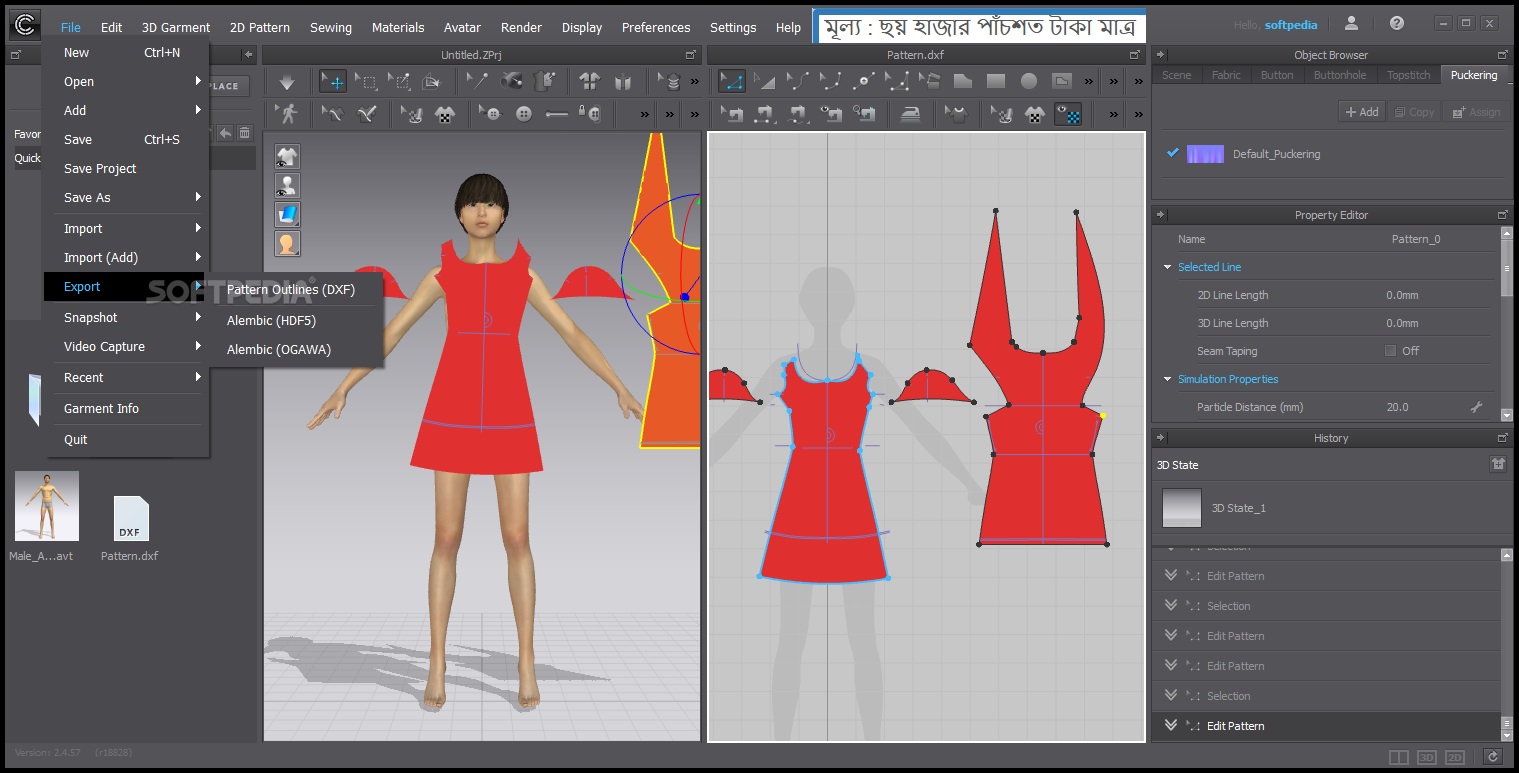
Nowadays, many traditional industries (such as fashion design & production) increasingly depend on powerful and professional design software to complete production tasks better and efficiently. For the fashion industry in the past, the steps including patterning, material selecting, tailoring, sewing and more needed to be repeatedly modified and were very time-consuming in the process of designing clothes. However, we can rely on software like CLO now.

CLO is a fully-functional, flexible visual 3D clothing design software specially made for the clothing industry, developed by CLO Virtual Fashion from Korea. It provides cutting-edge simulation technology for the fashion and apparel industries, completely simulates the physical properties of fabrics through complex algorithms, so as to show exactly how they would look in real life. In addition, CLO also supports real-time viewing of the realistic simulation effect of modified clothing (including board, color, texture, details, etc.) in 2D and 3D perspectives, and provides a variety of display options for users to choose freely.

Designers can use CLO to quickly design underwear, swimsuit, hat, handbag and anything else made from fabric on a custom virtual model, no matter how complicated its shape and details are. On the other hand, CLO can not only reduce unnecessary production and transportation costs of actual samples, reduce the preparation time required for design, reduce the production time of traditional technology to reduce costs, but also greatly improve the efficiency of clothing design and production. Even, with help of CLO, designers are able to create a 3D model of a beautiful suit in just 10 minutes now.

// Key Features //

Feature Description
MODULAR DESIGN
  • Configurator
  • Modular Template Files
  • Sewing Blocks
  • Edit Block Components
3D SIMULATION & LAYER
  • Real Time Sync/Simulation
  • Real Time Garment Move
  • High-Definition Garment
  • Pattern Layer
  • Pattern Sublayer
  • Sewing Layer
  • Fold Pattern
  • Fold Seam Lines
3D GARMENT EDIT
  • 3D Line on Pattern
  • Cut 3D Pattern
  • Flattening
  • Select Single/Multi Meshes
  • Single/Multi Pins
  • Freeze/Deactivate
  • Strengthen
  • Glue Trim/OBJ
3D ARRANGEMENT
  • Gizmo
  • Arrangement Point
  • Direct Positioning
  • Fold Arrangement
  • Arrange as Flat/Curved
  • Flip Patterns
  • Superimpose
  • Smart Arrangement
2D PATTERN DESIGN
  • Create/Edit Pattern
  • AI Curve (Bézier Curve)
  • Symmetric/Instance Design
  • Dart/Pleats Fold
  • Notch
  • Trace
  • Symbol/Annotation
  • Seam Allowance
  • Reference Lines
GRADING
  • Add Pattern Size
  • Edit Pattern Size
  • Patten Size Table
SEWING & TACKING
  • Segment Sewing
  • Free Sewing
  • M:N Sewing
  • Sewing Notch
  • Symmetric Sewing
  • Tack on Garment
  • Tack on Avatar
  • Pleats Sewing
FABRIC
  • Fabric Kit
  • Emulator
  • Image Open/Save
  • Edit Color Swatch
  • Physical Properties
  • Nonlinear Simulation
  • Set Fabric Thickness
HARDWARES & TRIMS
  • Zipper
  • Button/Button Hole
  • Elastic
  • Glue Trim/OBJ
  • Custom Trim/OBJ
  • Scale Trim/OBJ
  • Topstitches (OBJ/Image)
  • Piping
FINE-TUNING
  • OBJ Weight
  • Puckering
  • Bond/Skive
  • Press
  • Steam
  • Solidify
  • Pressure
AVATAR
  • Edit Avatar Style
  • Edit Avatar Size
  • Avatar Measurement
  • Avatar Tape
  • Edit Avatar Pose (FK/IK)
  • Edit Arrangement Point
  • Avatar Skin Offset
  • Avatar Friction
FIT CHECK
  • 2D Pattern Measure
  • 3D Garment Measure
  • Check 2D Sewing Length
  • Transparent Map
  • Pressure Points
  • Strain/Stress Map
  • Fit Map
  • 1:1 View
  • 3D State History
COLORWAY
  • Create Colorways
  • Edit Textures/Colors
  • Color Name Input
  • Viewer Mode
PRINT LAYOUT
  • Print Layout 2D Snapshot
  • Arranging Patterns
  • Roll Width Settings
RENDER IMAGE/VIDEO
  • High Quality Render
  • Single/Multi Images
  • Turntable Images
  • Turntable Video
  • Light Properties
  • Render Properties
ANIMATION (RUNWAY)
  • Record
  • Play
  • Edit
  • Animation Video Capture
LINESHEETS & COLLABORATION VIA CLOSET
  • Web-based communication platform
  • Safely Upload & Share Files
  • Create Linesheet
3D ENVIRONMENT
  • Gizmo Settings
  • Setting Light
  • Setting Wind Effect
  • Camera Settings
  • Setting Custom View
  • Setting Ground
  • Format 3D Background
  • Simulation Properties
CONFIGURATION
  • Language
  • Unit
  • Grid/Snap
  • Smart Guide
  • Tablet Preset
  • Multiple Program Windows
  • Window/Toolbar Layout
COMPATIBLE FILE
  • DXF-ASTM/AAMA
  • AI/PDF
  • Auto Refresh Graphic with AI
  • BOM (XML)
  • OBJ
  • OpenCollada
  • FBX
  • LXO
  • Alembic
  • Animation (MC, PC2, MDD)
  • Color Swatch (ACO)


Reviews

There are no reviews yet.

Be the first to review “CLO3D Standalone & Enterprise 7.0/2.5”

Your email address will not be published. Required fields are marked *